
Your Process is the Problem
The SMB Guide to Execution Without the Bloat

By Justin Oberbauer
Project management shouldn't feel like a second job. For small and midsize businesses (SMBs), the goal isn't to create pixel-perfect Gantt charts or maintain a library of rigid documentation—it's to get work across the finish line.
Yet, most "best practices" are designed for massive corporations with thousands of employees and dedicated PMO offices. When those heavy processes are forced onto smaller, fast-moving teams, they don't provide structure; they create friction.
We believe in Project Management for the Rest of Us. This guide covers the frameworks, habits, and shortcuts that actually work for teams that need to stay nimble. Whether you are scaling from 5 to 50 employees or managing high-velocity client work, the following strategies focus on one thing: replacing administrative friction with operational flow.
1. Planning & Prioritization: Planning for Momentum
The biggest mistake SMB teams make is front-loading projects with heavy planning that becomes obsolete by week two. In a fast-scaling environment, effective planning is about clarity, not certainty.
The One-Page Project Charter
Avoid the "novel-length" project brief. Stakeholders rarely read them, and they are difficult to update. Instead, use a One-Page Charter. This document serves as the project's "Constitution." If a dispute arises later about scope or goals, you refer back to this single page.
The Charter must answer four critical questions:
The "Why": What business problem are we solving? (e.g., "Our checkout bounce rate is 40%, and we need to lower it to 25%.")
The "What": What is the specific, measurable output? (e.g., "A redesigned mobile-responsive checkout page.")
The "Who": Who is the single point of accountability? (Use the DRI model: Directly Responsible Individual). Tools that enable centralized communication directly on tasks help ensure everyone knows who owns what.
The "Success": What does a "win" look like in 1 month?
Weekly vs. Quarterly Planning
While quarterly goals provide the North Star, short cycles save teams from burnout. For SMBs, a one-month lookahead with a heavy emphasis on the next 7 days is usually the "sweet spot."
The Cadence of Momentum:
Quarterly: Set the "big rocks." What are the 3 things that MUST happen this quarter?
Monthly: Review progress and adjust the roadmap.
Weekly: This is where the work happens. At the start of every week, the team should know exactly which tasks are the priority.
Prioritization Frameworks: How to Say "No"
When everything is a priority, nothing is. Use these two classic tools to filter the noise:
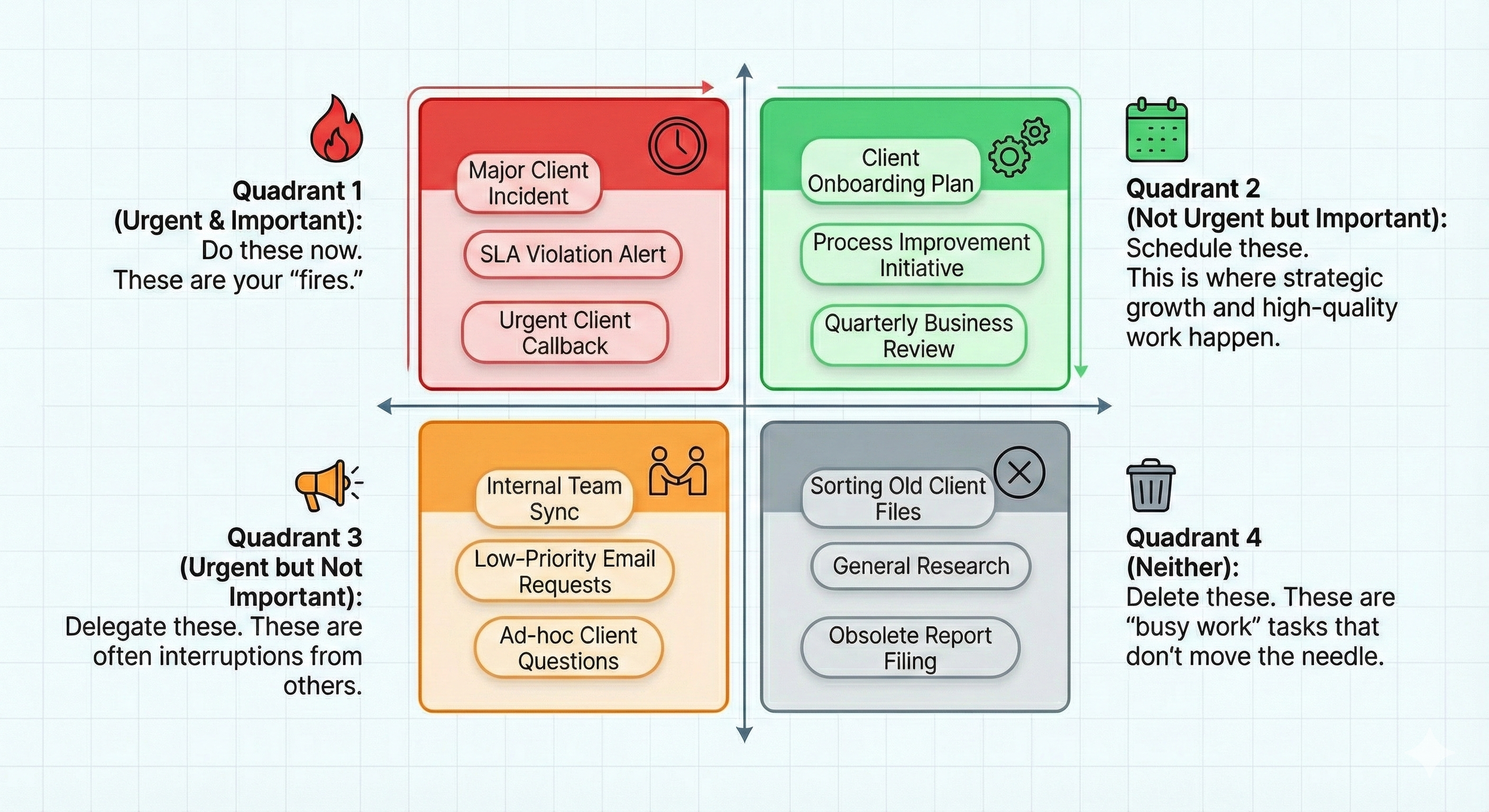
The Eisenhower Matrix
The Eisenhower Matrix helps you sort tasks by urgency and importance:
Quadrant 1 (Urgent & Important): Do these now. These are your "fires."
Quadrant 2 (Not Urgent but Important): Schedule these. This is where strategic growth and high-quality work happen.
Quadrant 3 (Urgent but Not Important): Delegate these. These are often interruptions from others.
Quadrant 4 (Neither): Delete these. These are "busy work" tasks that don't move the needle.
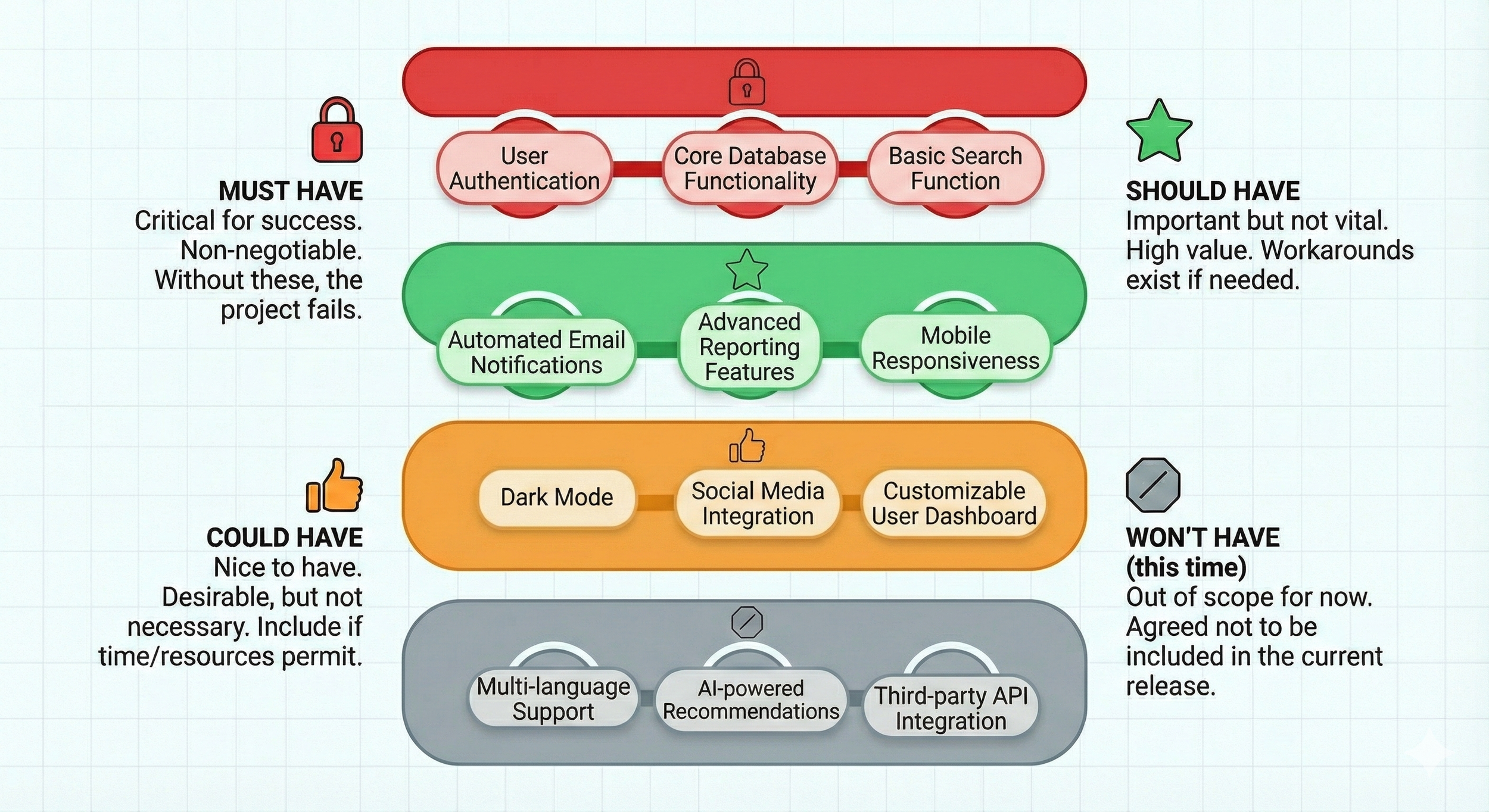
The MoSCoW Method
The MoSCoW Method is specifically useful for managing stakeholder expectations and protecting your team from over-commitment:
Must-have: Non-negotiable requirements that the project cannot launch without.
Should-have: Important requirements that add significant value but can be deferred if time runs out.
Could-have: "Nice-to-haves" that add polish but aren't vital to the core mission.
Won't-have: Explicitly agreed-upon items that are out of scope for this version/phase.
2. Agile & Kanban for Non-Software Teams
You don't need to be a software developer to work in "sprints." Agile and Kanban are often buried in technical jargon, but their core principles—visualizing work and limiting work-in-progress (WIP)—are secret weapons for any creative or ops team.
Kanban 101: Visualizing Your Workflow
The human brain processes visuals much faster than text. Moving tasks through a simple visual board allows you to spot bottlenecks instantly.
How to set up your board:
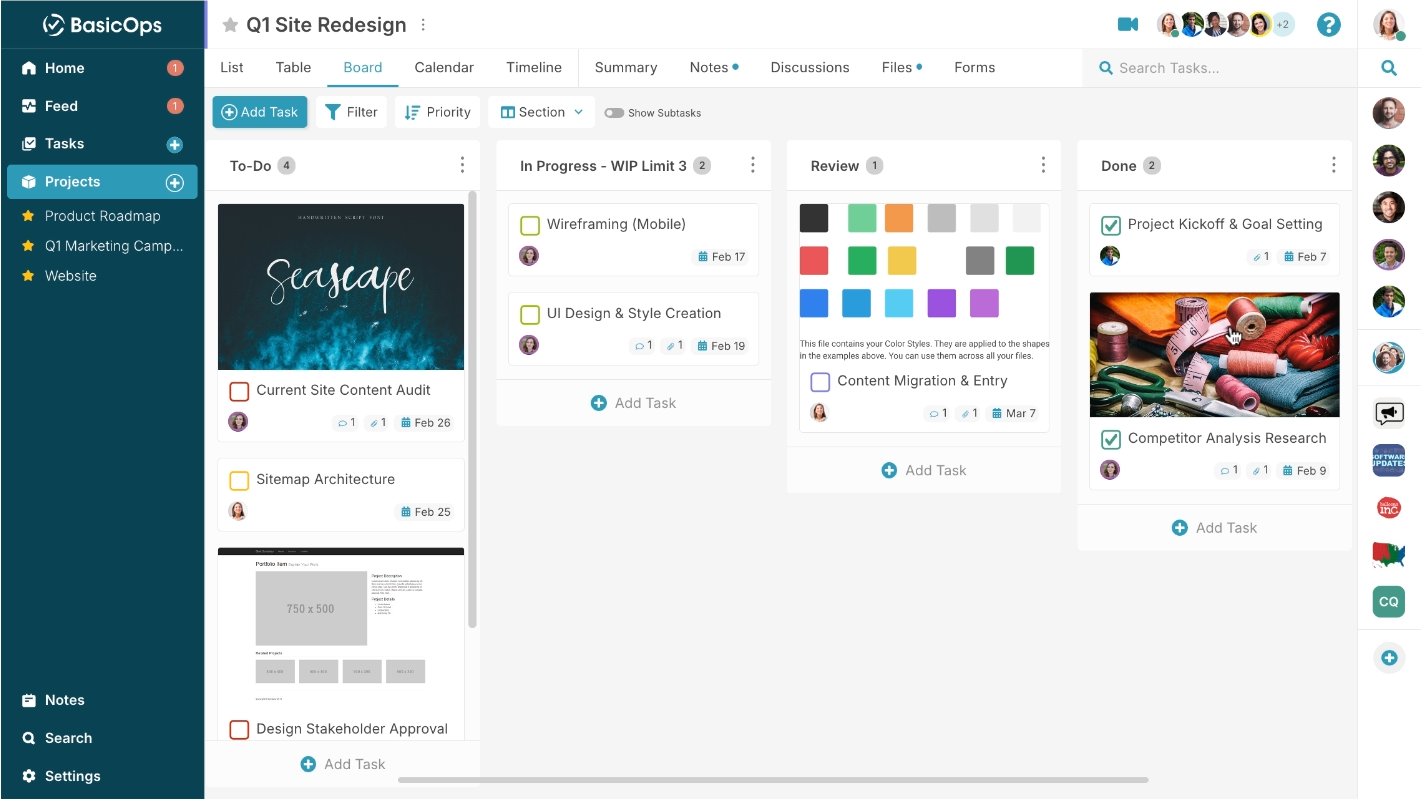
Kanban Board
To-Do: The backlog of all upcoming tasks, ranked by priority.
In-Progress: Tasks currently being worked on. Crucial rule: Limit this to 2-3 tasks per person to prevent context switching and burnout.
Review/Approval: Where work sits when it's waiting for a manager, legal, or client.
Done: The graveyard of completed wins.
Adapting Sprints for Creative and Ops Teams
A traditional two-week software sprint can feel restrictive for marketing or sales. Instead, try the "Weekly Pulse."
Monday Morning Kickoff: Spend 20 minutes selecting the "Commitments" for the week.
Mid-Week Check: A quick async update on Wednesday to see if anything is stalled.
Friday Demo: Ship what was finished. Anything not finished isn't a failure; it's data that helps you plan more accurately for the following week.
The 15-Minute Daily Sync (The "Standup")
If your daily standup lasts 45 minutes, it's not a standup; it's a status meeting. To keep it fast, every person answers only three things:
What did I finish yesterday? (Focus on outcomes, not "I was busy.")
What am I focusing on today?
What is blocking me?
Pro-Tip: Don't solve the blockers during the meeting. Identify them, then schedule a "sidebar" for only the relevant people afterward.
3. Execution & Delivery: Navigating the "Messy Middle"
Projects rarely go exactly according to plan. The difference between a successful delivery and a missed deadline is how you handle the middle phase of the project, where enthusiasm wanes and complexity peaks.
The Art of the Check-In
Micromanagement is the enemy of velocity. Instead of "nagging" for updates, set a cadence for Asynchronous Updates.
Use your project management tool to post a Friday "Pulse Report." Use the RYG Status:
Green: Everything is on track. No help needed.
Yellow: We are facing a minor delay or a "Should-have" task might be cut.
Red: We will miss a deadline or a "Must-have" item is blocked.
This gives leadership peace of mind without interrupting the team's "deep work" flow with constant Slack pings. The key is using one place where conversations stay connected to the work, eliminating the need to ping between multiple tools.
Managing Scope Creep
"Scope creep" is the slow death of a project. It happens when small, "simple" requests are added until the original deadline becomes impossible.
The "Yes, And" Rule:
When a client or stakeholder asks for a new feature mid-project, never say a flat "no." Instead, say: "Yes, we can absolutely add that. And here is how it will impact the budget and the launch date. Would you like to swap an existing task for this one, or extend the deadline?"
Risk Management: 5 Signs a Project is Going Off the Rails
You don't need a complex risk register. Just watch for these red flags:
The "Silent" Teammate: Someone who usually updates frequently suddenly goes quiet.
The 90% Syndrome: A task stays at "90% complete" for more than three days.
Decision Paralysis: Stakeholders spend three meetings debating a font color or a button label. This phenomenon is well-documented in research on decision fatigue.
Meeting-to-Work Ratio: You're spending more time talking about the work than doing the work.
Vague Updates: If an update is "I'm working on it," rather than "I'll have the draft done by 4 PM," clarity is lost.
4. Templates & Toolkits: Efficiency Through Consistency
Don't reinvent the wheel. Consistency reduces friction. When every project follows the same basic structure, your team can focus on the creative work rather than the administrative management.
The Lightweight Project Plan Template
A good project plan shouldn't be a 50-tab spreadsheet. It should be a simple list of Milestones and Tasks.
Milestone 1: Research & Discovery (Date)
Milestone 2: First Draft/Prototype (Date)
Milestone 3: Feedback & Iteration (Date)
Milestone 4: Final Approval & Launch (Date)
The "Post-Mortem" Retrospective Guide
Most SMBs skip the "Post-Mortem" because they are already onto the next project. This is a mistake. Improving your process is the only way to scale without adding more managers.
Hold a 30-minute meeting after every major project and ask:
What went well? (What should we do again?)
Where did we get stuck? (Where was the friction?)
What will we change for next time?
5. Building a Culture of Accountability
At the end of the day, no tool or framework can replace a culture of accountability. In an SMB, you can't hide behind layers of management.
The "Definition of Done"
One of the most common sources of friction is a misunderstanding of when a task is actually finished. Does "Done" mean the draft is written? Or does it mean the draft is written, proofread, uploaded to the CMS, and scheduled?
Action Item: Define "Done" for your most common tasks (e.g., a blog post, a social ad, a client report).
Ownership vs. Tasks
Encourage your team to own outcomes, not just tasks.
Task-focused: "I sent the email to the client."
Outcome-focused: "I made sure the client approved the design so we can start development on Monday."
When people own the outcome, they are more likely to proactively solve problems rather than waiting for a manager to tell them what to do next.
6. Frequently Asked Questions (FAQ)
How do I implement project management practices without overwhelming my small team?
Start with just one element at a time—pick the One-Page Project Charter for your next project and implement a simple Kanban board. Avoid rolling out comprehensive frameworks all at once. The key is to add structure that reduces friction, not creates it. Begin with weekly planning cycles rather than elaborate quarterly roadmaps, and focus on visibility: make sure everyone can see what's happening and what's blocking progress. Most importantly, frame any new process as a way to protect your team's time and focus, not as administrative overhead.
What's the difference between Agile and Kanban, and which one should my team use?
Agile is a broad philosophy that includes specific frameworks like Scrum (with two-week sprints, daily standups, and defined roles). Kanban is a visual workflow system focused on limiting work-in-progress and continuous flow. For most SMBs, especially non-software teams, Kanban is the better starting point because it's more flexible and doesn't require you to restructure your entire workflow. You can adopt Kanban today by simply visualizing your current work on a board. If you later want more structure, you can add sprint-like elements (what this guide calls the "Weekly Pulse") without committing to full Scrum ceremonies.
How do I get executives and stakeholders to stop adding last-minute requests to projects?
Use the "Yes, And" technique: never refuse a request outright, but always present the trade-offs transparently. When a stakeholder asks for a new feature mid-project, respond with: "Yes, we can add that. Here's how it affects our launch date and budget. Would you like to swap out an existing 'Should-have' item, extend the deadline, or add resources?" This approach forces a real conversation about priorities rather than just absorbing scope creep. Additionally, make your project status visible using the RYG (Red/Yellow/Green) system so stakeholders can see when the project is at capacity before making new requests.
Our team hates status meetings—how do we keep projects on track without them?
Replace synchronous status meetings with asynchronous updates. Implement a weekly "Pulse Report" where team members post their RYG status (Green = on track, Yellow = minor issues, Red = blocked) in your project management tool every Friday. For daily coordination, use a quick 15-minute standup where each person only answers three questions: What did I finish yesterday? What am I focusing on today? What's blocking me? Don't solve problems during the standup—just identify them and schedule sidebars with only the relevant people afterward.
How do I manage multiple projects at once without burning out?
The key to multi-project management is staggering. Avoid starting three major projects in the same week. Use a "Master Calendar" to visualize the heavy-lift phases (like discovery or launch) of each project. If you see two launches overlapping, move one. Additionally, prioritize your "deep work" blocks; spend your mornings on the highest-stakes project before the "status update" requests from other projects begin to flood your inbox.
What is the best project management software for SMBs?
The "best" tool is the one your team will actually use. For SMBs, avoid "Enterprise" tools that require a full-time administrator to maintain. Look for a platform that offers visual flexibility (Kanban/List/Calendar), a clean UI, and centralized communication directly on tasks.
How do I handle a team member who resists process?
Resistance usually comes from a fear of "red tape." Explain the "Why" behind the process. Instead of saying, "We are doing this because it's a best practice," say, "We are using this Kanban board so I don't have to ping you three times a day for a status update." When people see that a process protects their time and focus, they stop resisting it.
What is the difference between a Project and a Process?
A Project has a specific start and end date (e.g., launching a new website). A Process is a repeatable sequence of events that happens regularly (e.g., monthly billing). Don't manage a process like a project; use a recurring checklist instead.
How do we keep stakeholders happy when a project is delayed?
Transparency is your best friend. Most stakeholders don't mind a delay as much as they mind a surprise. As soon as you hit a "Red" status, communicate it. Explain why the delay happened, what you are doing to fix it, and how the new timeline looks. Providing a solution alongside the bad news maintains trust.
How do I know when a project is starting to fail?
Watch for these five red flags: (1) A usually-communicative teammate goes silent; (2) A task stays at "90% complete" for more than three days; (3) Stakeholders spend multiple meetings debating minor details like fonts or button colors; (4) You're spending more time in meetings talking about the work than actually doing the work; (5) Updates become vague—"I'm working on it" instead of "I'll have the draft done by 4 PM." When you spot any of these patterns, immediately schedule a short check-in with the person or team involved to identify the root blocker.
What should I do after a project ends to improve our processes?
Always conduct a 30-minute Post-Mortem retrospective, even for small projects. Ask three questions: (1) What went well that we should repeat? (2) Where did we get stuck and encounter friction? (3) What will we change for next time? Document these insights and actually implement at least one change before your next project. The teams that scale successfully without adding layers of management are the ones that continuously refine their processes based on real experience, not theoretical best practices.
Final Summary for the Fast-Moving Team
Project management for the rest of us isn't about complexity; it's about consistency. By stripping away the enterprise bloat—the 50-page briefs, the three-hour meetings, and the rigid hierarchies—you allow your team to do what they were hired to do: execute.
Focus on these three pillars:
Visibility: Everyone can see what's happening.
Velocity: Work moves forward every day.
Value: You are working on the things that actually move the needle.
Ready to transform how your team works?
The best way to start is by picking one area—perhaps your prioritization or your daily sync—and refining it this week. Pick one project, apply the "One-Page Charter," and set up a simple Kanban board. You'll be surprised at how much faster things move when you stop managing the process and start managing the work.
Ready to get started? Check out how BasicOps can help transform how your team works. Start your free trial today at basicops.com.
